Kali Linux — All Commands
Personal reference for Kali commands, installs & WSL setup.

📋 Quick Index
1. Repository2. No Sound3. Fix Broken 4. WiFi5. Bluetooth6. Install SW 7. Snap8. Uninstall9. Force Stop 10. Software Table11. Delete File 12. Wine 13. WSL 2: ↳ Setup ↳ Password Reset ↳ Desktop ENV
1. Repository2. No Sound3. Fix Broken 4. WiFi5. Bluetooth6. Install SW 7. Snap8. Uninstall9. Force Stop 10. Software Table11. Delete File 12. Wine 13. WSL 2: ↳ Setup ↳ Password Reset ↳ Desktop ENV
#1 Add Kali Repository
Just copy & paste into your Terminal — Done ✔️
echo "deb http://http.kali.org/kali kali-rolling main contrib non-free" | sudo tee /etc/apt/sources.listOfficial Website →
#3 Fix Broken Installation
apt --fix-broken install
#4 WiFi Connected but Not Working
sudo systemctl status systemd-resolved.service
sudo systemctl restart systemd-resolved.service
sudo systemctl status systemd-resolved.service
#5 Turn ON Bluetooth
service bluetooth restart
#6 Install Software in KALI Linux
sudo dpkg -i *.deb                 # normal .deb file
./configure  ---  make install     # compile from source
How to install →
#7 Snap Install
sudo su
sudo apt update
sudo apt install snapd
systemctl enable --now snapd apparmor
Snap installed but not working?
systemctl enable --now snapd.apparmorSnap Store guide →
#8 Uninstall Software
dpkg --list
sudo apt remove gimp
sudo apt --purge remove gimp
sudo apt-get autoremove
sudo apt purge --auto-remove gimp
sudo apt clean
#9 Force STOP any Running Program
pidof [appname]
kill -9 [PID]
#10 All Important Software in KALI
| Name | Work | apt install | snap install | flatpak install |
|---|---|---|---|---|
| Prerequisites: Add Kali Repo | Install Snap | Setup Flathub | ||||
| Office 365 | Microsoft Office | sudo snap install office365webdesktop --beta | ||
| Messaging | sudo snap install whatsapp-for-linux | flatpak install flathub com.github.eneshecan.WhatsAppForLinux | ||
| Telegram | Messaging | sudo snap install telegram-desktop | flatpak install flathub org.telegram.desktop | |
| Viber | Messaging | Download .deb | sudo snap install viber-unofficial | flatpak install flathub com.viber.Viber |
| Google Messages | Messaging | Web App | ||
| KDE Connect | File Transfer | sudo apt install kdeconnect | ||
| FreeCAD | Engineering Drawing | sudo apt install freecad | sudo snap install freecad | flatpak install flathub org.freecadweb.FreeCAD |
| Shotcut | Video Editor | sudo apt install shotcut | sudo snap install shotcut --classic | flatpak install flathub org.shotcut.Shotcut |
| GIMP | Photo Editor | sudo apt install gimp | sudo snap install gimp | flatpak install flathub org.gimp.GIMP |
| SimpleScreenRecorder | Screen Recorder | sudo apt install simplescreenrecorder | ||
| Audacity | Audio Editor | sudo apt install audacity | sudo snap install audacity | |
| HandBrake | Video Compressor | sudo apt install handbrake | sudo snap install handbrake-jz | flatpak install flathub fr.handbrake.ghb |
| Code::Blocks | Coding IDE | sudo apt install codeblocks | ||
| Blender | 3D / Graphic Design | sudo apt install blender | sudo snap install blender --classic | flatpak install flathub org.blender.Blender |
| kTouch | Typing Practice | sudo apt install ktouch | ||
| VirtualBox | Virtualization | sudo apt install virtualbox | ||
| Terminator | Terminal Emulator | sudo apt install terminator | ||
| MS Edge | Browser | Download .deb | ||
| Audacious | MP3 Player | sudo apt install audacious | ||
#11 Delete File
rm [file path]    # empty file / file
rm -r [dir]       # directory
#12 Install Wine (Windows emulator for Linux)
sudo dpkg --add-architecture i386
sudo apt update
sudo apt install wine wine64 wine32 winbind winetricks
wine yourapp.exe
#13 WSL 2 — Kali in Windows
13.1 Setup (PowerShell as Admin)
wsl --install
wsl --update
wsl --status
wsl --list --online
wsl --install -d kali-linux
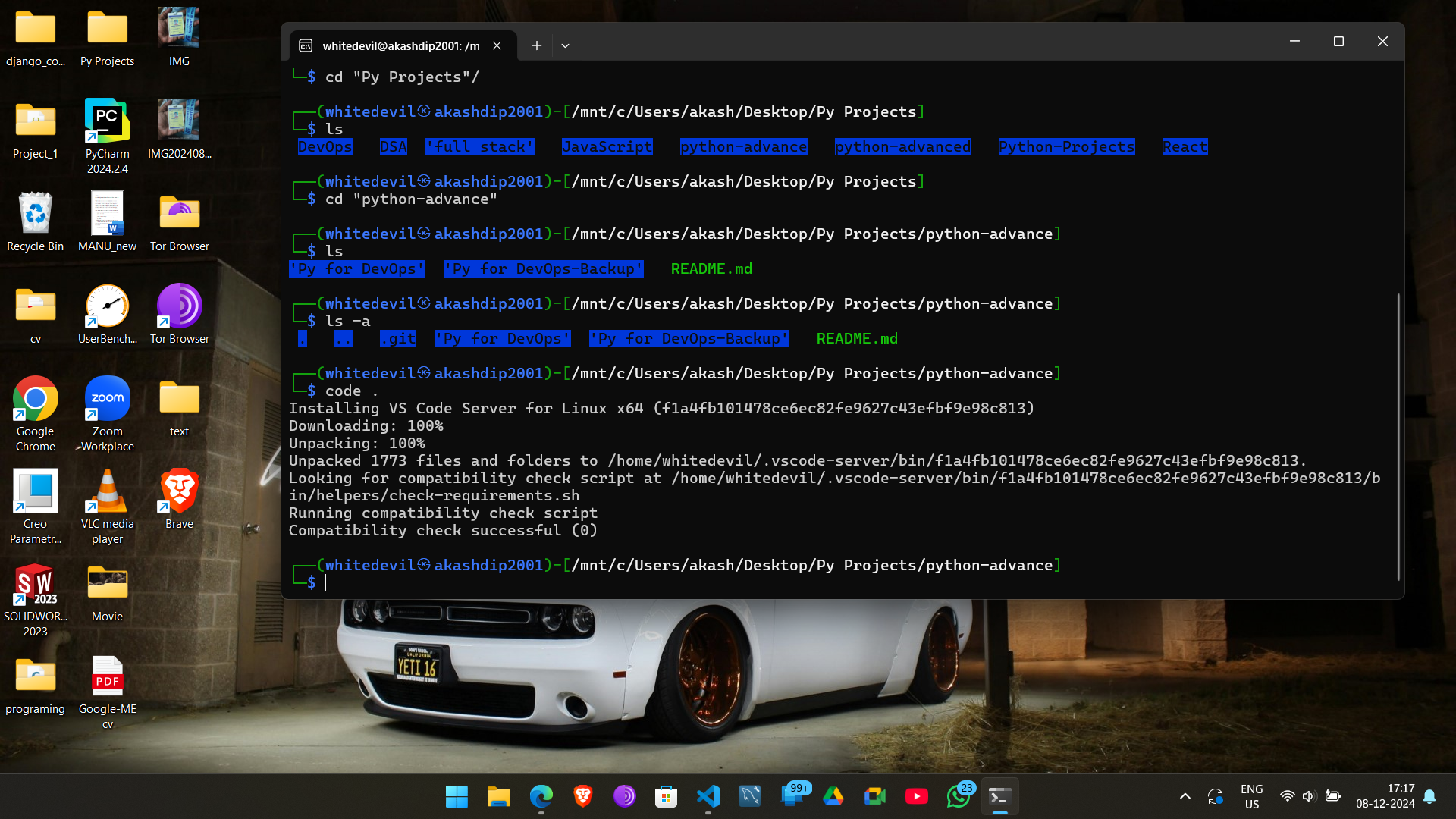
Navigate Windows files from Kali
ls /mnt          # c  d  e  wsl  wslg
cd /mnt/c/Users/akash/Desktop
WSL more details | File Permissions (quick) | Permissions deep dive ↗
Check Kali Version
cat /etc/os-release
# PRETTY_NAME="Kali GNU/Linux Rolling"
# VERSION_ID="2024.3"
13.2 Reset WSL Password 🔑
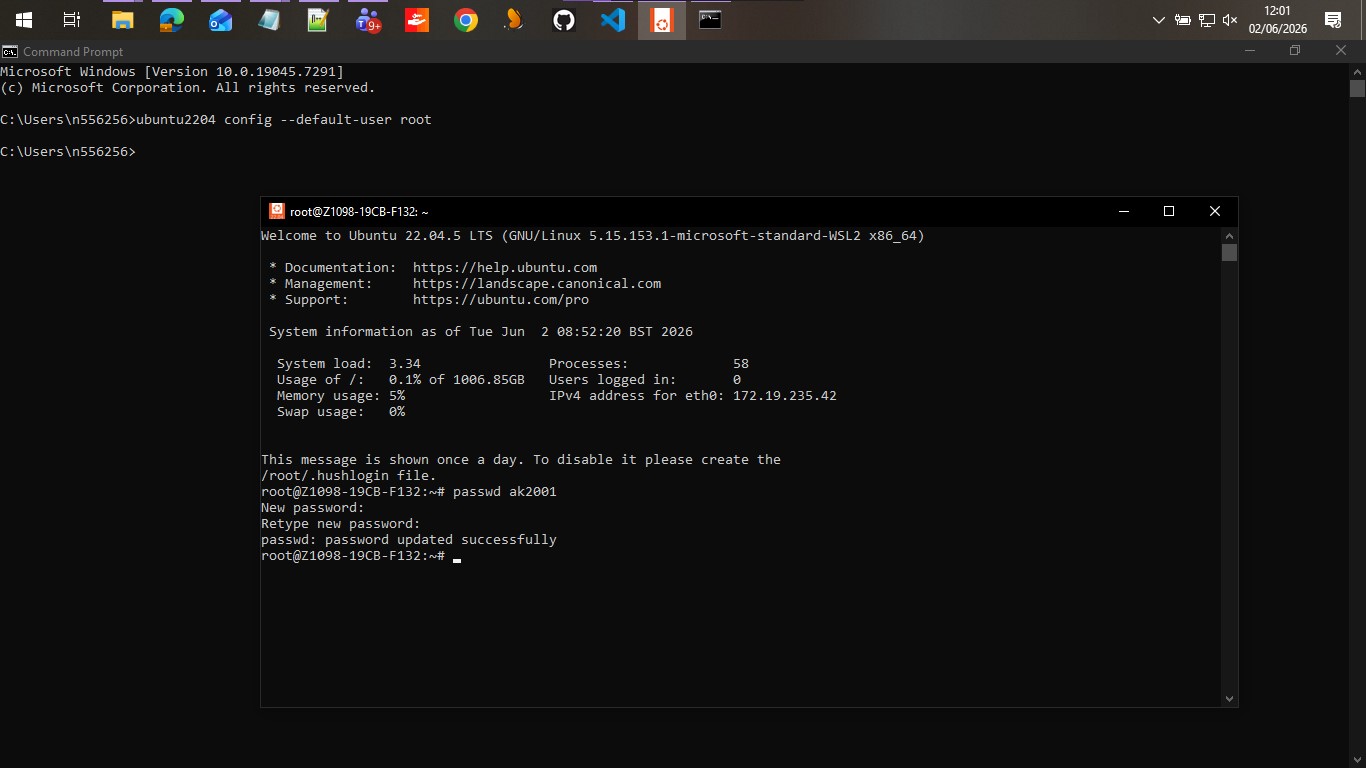
Forgot your WSL user password? Use Windows CMD to reset it via root.
# Step 1 — Open Windows CMD (not PowerShell) and set distro to login as root
ubuntu2204 config --default-user root
# (replace ubuntu2204 with your distro name, e.g. kali-linux)

# Step 2 — A root WSL shell opens automatically. Reset the password:
passwd <your-username>
# e.g.: passwd ak2001
# Enter new password when prompted

# Step 3 — Set your user back as default
ubuntu2204 config --default-user <your-username>
13.3 Install Desktop Environment
mini — kex server Not Recommended
sudo apt update && sudo apt upgrade -y
sudo apt install kali-win-kex
kex --win -s
kex --esm --ip -s   # for Windows Remote Desktop
.png)

Shut Down
exit
wsl --shutdown
Uninstall kex
sudo apt purge kali-win-kex xfce4 xfce4-goodies lightdm light-locker
sudo apt autoremove --purge && sudo apt clean
Full Desktop — GNOME Recommended
sudo apt update
sudo apt install kali-desktop-gnome gdm3
sudo update-alternatives --config x-session-manager
wsl --shutdown && wsl
.png)